Creating Completion Flows for Conditional Routing
Completion Flows enable you to automatically route participants to different destinations at the end of an interview based on information gathered during the conversation. Instead of sending everyone to the same generic thank you page, you can create personalized next steps that match each participant's specific situation, needs, or qualifications.
When to Use Completion Flows
Completion Flows are ideal for:
- Lead qualification – Route high-value leads to sales while sending others to self-service resources
- Support triage – Direct urgent issues to support tickets and simple questions to documentation
- Product recommendations – Send participants to relevant product pages based on their stated needs
- Follow-up research – Invite specific segments to additional studies while thanking others
- Incentive distribution – Provide different reward instructions based on eligibility criteria
- Conversion optimization – Guide qualified prospects to booking pages and others to nurture content
How Completion Flows Work
During the interview, Perspective AI naturally gathers information about the participant. At the end of the conversation, Completion Flows evaluate this information against conditions you've defined and automatically redirect participants to the appropriate destination.
The process:
- Participant completes the interview
- Perspective evaluates the information gathered against your defined conditions
- The system determines which condition is met
- Participant is automatically redirected to the corresponding URL
- No manual routing or follow-up required
Setting Up Completion Flows
Step 1: Define your routing logic
Before configuring Completion Flows, identify:
- What criteria should determine routing? (budget, company size, urgency, use case, etc.)
- What are the threshold values? (specific numbers, categories, yes/no answers)
- Where should each segment go? (URLs for each possible outcome)
Step 2: Tell Perspective your conditions
Simply instruct Perspective conversationally about what you want to happen at the end of interviews. Perspective will automatically add a "Completion Flow" section to your research outline.
Example instruction:
"Add a completion flow: if the participant's budget is more than $5,000 per month, redirect them to https://example.com/book-sales-call. If their budget is less than $5,000 per month, redirect them to https://example.com/pricing-guide."
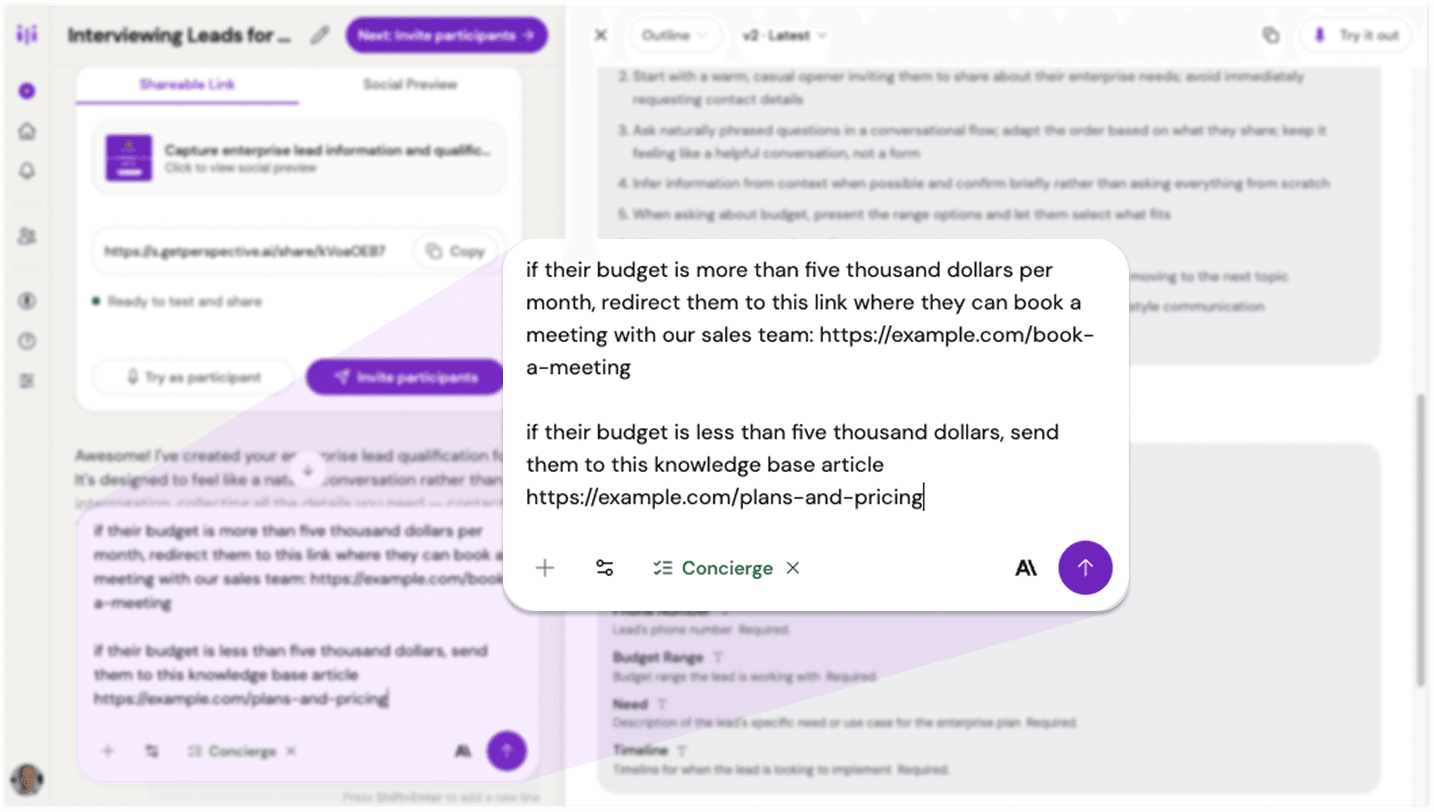
Dictating completion flow instructions to Perspective
Step 3: Review the updated outline
The research outline will update within a few seconds. Your new Completion Flow section will appear in the outline structure with your conditional routing logic.
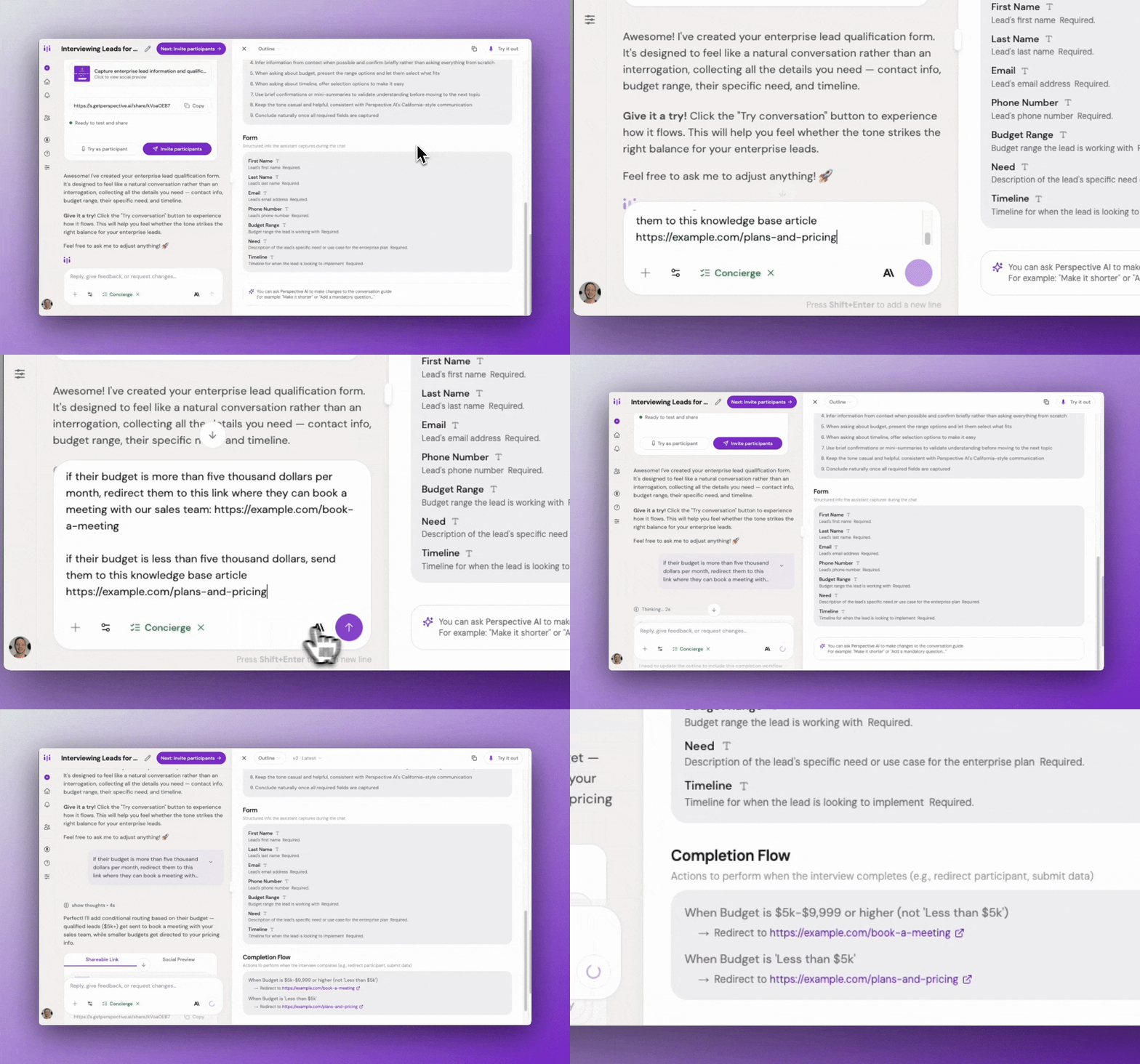
Research outline showing completion flow section
That's it—your completion flow is configured and ready to use.
Step 4: Test your flow
Before inviting participants:
- Take the interview yourself
- Provide responses that would trigger each condition
- Verify you're redirected to the correct destination
- Test edge cases (missing information, ambiguous responses)
Step 5: Launch your research
Once you've confirmed the flow works correctly, invite participants. Each person will automatically be routed to the appropriate destination based on their responses.
Example Scenarios
Scenario 1: Enterprise Lead Qualification
Goal: Route qualified leads to sales while providing self-service resources to others
Instruction to Perspective:
"Add a completion flow: if monthly budget is greater than $5,000 and company size is greater than 100 employees, redirect to example.com/book-enterprise-demo. Otherwise, redirect to example.com/self-service-plans."
Outcome: High-value prospects connect directly with sales while smaller prospects get immediate access to information.
Scenario 2: Support Request Triage
Goal: Prioritize urgent issues while routing simple questions to documentation
Instruction to Perspective:
"Add a completion flow: if the issue is blocking their work and marked as urgent, redirect to support.example.com/create-ticket with priority set to high. For general questions or feature requests, redirect to docs.example.com/help-center."
Outcome: Critical issues get immediate attention while documentation handles routine questions.
Scenario 3: Product Recommendation
Goal: Send participants to the most relevant product page based on their use case
Instruction to Perspective:
"Add a completion flow based on their primary use case: for team collaboration, redirect to example.com/products/team-workspace. For individual productivity, redirect to example.com/products/personal-assistant. For analytics and reporting, redirect to example.com/products/business-intelligence."
Outcome: Each participant lands on the product page that matches their needs.
Scenario 4: Follow-Up Research Invitation
Goal: Invite engaged power users to deeper research while thanking others
Instruction to Perspective:
"Add a completion flow: if the user uses the product daily and is interested in beta features, redirect to example.com/join-beta-research-panel. Otherwise, redirect to example.com/thank-you."
Outcome: Target advanced research opportunities to the right segment without spamming others.
Scenario 5: Incentive Eligibility
Goal: Provide different incentive instructions based on completion quality
Instruction to Perspective:
"Add a completion flow: if the interview was completed in full and the participant provided detailed feedback, redirect to rewards.example.com/claim?tier=premium. If the interview was brief or they skipped questions, redirect to rewards.example.com/claim?tier=standard."
Outcome: Reward engagement quality while still thanking all participants.
Refining Your Completion Flow
Like other parts of your research outline, you can refine completion flows conversationally:
Example refinements:
- "Update the completion flow to use a $10,000 threshold instead of $5,000"
- "Add a third condition for mid-market companies between 50-100 employees"
- "Change the redirect URL for budget-conscious users"
Each change generates an updated outline with your revised completion flow logic.
Best Practices
Keep conditions clear and measurable. Use specific thresholds that Perspective can evaluate objectively: "budget over $5,000" not "seems interested in enterprise."
Test all paths. Ensure you've tested scenarios that trigger each possible redirect. Missing edge cases can send participants to the wrong destination.
Provide fallback logic. Define what happens when information is ambiguous or missing. Always have a default destination.
Use meaningful URLs. Ensure redirect destinations are relevant and valuable to the participant based on their responses.
Limit complexity. Start with 2-3 conditions. Overly complex routing logic is difficult to test and maintain.
Make destinations mobile-friendly. Many participants complete interviews on mobile devices. Ensure redirect pages work well on all screen sizes.
Track outcomes. Monitor which paths participants take to understand your audience distribution and optimize routing over time.
Communicate next steps. Before redirecting, Perspective should acknowledge what's happening: "Based on your needs, I'll connect you with our sales team" or "I'll send you to our pricing guide."
Common Pitfalls & Fixes
Ambiguous conditions → Be specific when instructing Perspective. "High budget" is vague; "budget over $10,000 per month" is clear and actionable.
Missing fallback → Always define what happens if none of your conditions are met. Include an "otherwise" or "for all other cases" instruction.
Untested edge cases → Test scenarios where participants provide unexpected answers, skip questions, or give ambiguous responses.
Too many conditions → More than 5 conditions becomes difficult to manage and test. Simplify by grouping similar outcomes.
Broken redirect URLs → Verify all destination URLs work before launching. A 404 error creates a poor participant experience.
Logic conflicts → Ensure conditions don't overlap. Make your instructions clear about which condition takes precedence.
Ignoring mobile experience → Test redirect destinations on mobile devices. Poor mobile experiences lose engaged participants.
Not communicating the redirect → Participants should understand why they're being sent somewhere. Have Perspective explain the next step before redirecting.
Technical Considerations
URL validation: Ensure all redirect URLs are properly formatted and accessible.
Parameter passing: You can include URL parameters in redirect links to pass context to the destination page.
Timing: Redirects happen after the interview conclusion message, giving participants a moment to understand what's happening next.
Multiple conditions: When multiple conditions could apply, be clear about priority in your instructions to Perspective.
Combining Completion Flows with Other Features
With URL Parameters: Pass interview data to the redirect destination for personalized landing pages.
With Form Fields: Use structured data collected during the interview as routing criteria.
With User Interviews Integration: Use Completion Flows to redirect back to User Interviews with custom parameters based on interview outcomes.
Availability
Completion Flows are available for all Perspective AI customers. Start creating personalized post-interview experiences that turn research insights into immediate action.